
Key Takeaways
- Intraoral scanners produce STL files with 2-4 million triangles. Rendering these in the browser requires a level-of-detail pipeline, not just a bigger GPU.
- Binary STL parsing in a streaming Node.js service avoids loading full meshes into memory, which matters when handling concurrent uploads from multiple clinics.
- Quadric Edge Collapse decimation can reduce triangle counts by 85-95% while keeping Hausdorff distance under 0.05mm -- well within clinical tolerance for most review tasks.
- HIPAA-compliant scan storage requires more than encryption at rest. We used presigned S3 URLs with short TTLs and client-side-only rendering to keep PHI off the server after the initial optimization pass.
- The collaborative annotation layer turned out to be more valuable to clinicians than the 3D rendering itself. Build the communication tool first.
Who This Is For
This is a build write-up, so it goes deep into the engineering. Before that, here is the plain-language version and who each part is useful to.
A dentist uses a handheld intraoral scanner to take a 3D digital snapshot of a patient's teeth instead of a putty impression. That snapshot is saved as a large, detailed 3D file called an STL, which normally only opens in the scanner brand's own desktop software. Getting it to a dental lab usually means a USB drive, a vendor portal, or an email attachment. We built a tool that opens those files directly in a web browser, compresses them so they run on ordinary clinic computers, and passes the same scan through to the lab.
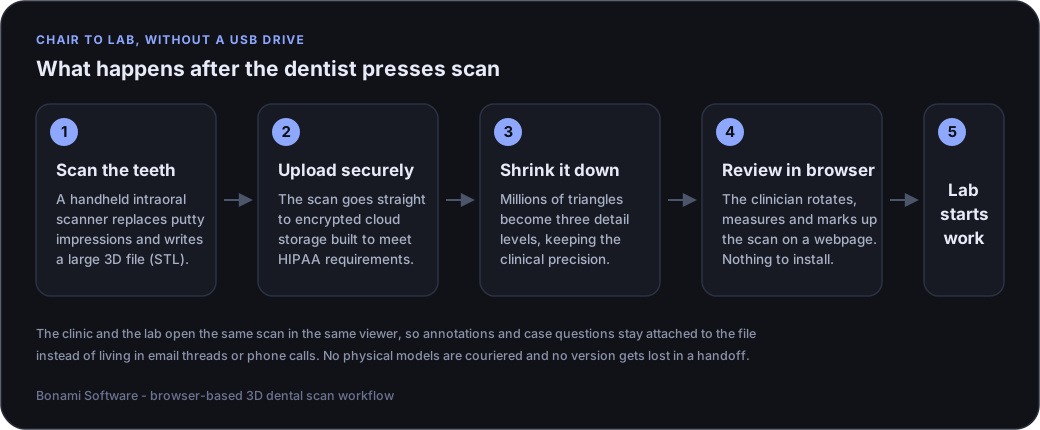
- Clinic owners and practice managers: read this section, the scanner compatibility section, the multi-location section, and the FAQ. Those cover what the tool does, what it works with, and what building something similar involves.
- Dental labs: the lab integration workflow section covers how cases arrive, how annotations come back, and how case status is tracked.
- Engineers and technical evaluators: the STL parsing, WebGL rendering, and cloud storage sections are the substance -- mesh decimation, level-of-detail streaming, and how we kept protected health information off the server after the initial processing pass.
One note on honesty up front: the performance numbers in this article are measured. The workflow outcomes reported by clinicians are qualitative feedback, not a controlled study, and we have flagged them as such where they appear.
The Problem with Physical Impressions
Dental practices that adopt intraoral scanners typically solve the scanning problem but not the workflow problem. The scanner produces an STL file. Then what? In most practices, that file gets exported to a USB drive, uploaded through the scanner vendor's desktop software, and emailed to a lab. Files get lost between handoffs. Labs receive the wrong version. Clinicians can't review scans without launching proprietary software that only runs on one workstation.
The underlying challenge is straightforward: intraoral STL files are large, dense meshes that need to be viewable in a browser, storable in a HIPAA-compliant way, and routable to downstream lab workflows without manual file shuffling. This post covers the architecture we built to handle that pipeline.
Why a Browser-Based Viewer
The alternative to a browser-based viewer is a native desktop application. We considered this and rejected it for two reasons. First, dental clinic IT environments are heterogeneous -- a mix of Windows 10 and 11 machines, varying GPU capabilities, and restrictive group policies that make desktop installs painful. Second, the lab technicians reviewing scans work in a different organization entirely, so distributing and maintaining a native app across organizational boundaries adds ongoing friction. A browser-based viewer with WebGL rendering sidesteps both problems.
The trade-off is performance. WebGL gives you less control over the rendering pipeline than a native OpenGL or Vulkan application. Clinic workstations typically run integrated Intel UHD 630 GPUs, which can handle maybe 300,000-500,000 triangles at 60fps in a Three.js scene. Full-arch dental scans can have 4 million triangles. That gap defined most of our technical decisions.
Architecture and Tech Stack
The system has three layers: an upload and processing pipeline that handles STL ingestion and mesh optimization, a storage layer for HIPAA-compliant scan persistence, and a browser-based viewer for rendering and annotation. Here is what we used and why.
- Frontend rendering: Three.js (r152). We evaluated Babylon.js as well. Three.js won on bundle size (roughly 150KB gzipped for the subset we needed vs 300KB+ for Babylon) and because its BufferGeometry API gave us direct control over vertex attribute layout, which mattered for our custom shaders.
- STL processing: A Node.js microservice for binary and ASCII STL parsing, mesh validation, and LOD generation. We chose Node over a C++ service because the I/O-bound nature of streaming large files from S3 favored Node's event loop, and the CPU-bound decimation work was offloaded to a compiled WASM module.
- Backend API: .NET 8 Web API for scan metadata, authentication, and lab routing. Entity Framework Core with PostgreSQL. Nothing exotic here -- it is a CRUD API with JWT-based auth and tenant isolation.
- Cloud storage: AWS S3 with AES-256 server-side encryption, presigned URLs for time-limited access, and CloudFront for edge caching of lower-resolution LODs.
- Real-time collaboration: SignalR WebSocket connections for live annotation sharing. We considered polling but the latency requirements for collaborative review (clinician and lab tech looking at the same scan simultaneously) made WebSockets the obvious choice.
What Makes HIPAA Compliant Dental Imaging Software Different
The key architectural constraint was that scan geometry constitutes PHI. Our approach: scan files are encrypted at rest in S3, accessed only through presigned URLs that expire after 15 minutes, and rendered entirely client-side. After the initial optimization pass in the processing service, the server never reconstructs a viewable 3D model. The browser fetches encrypted mesh data through an authenticated API gateway, decrypts it in memory, and renders it. When the session ends, the mesh data is discarded.
Audit logging captures every access event -- who viewed which scan, when, and for how long. This is stored in a separate, append-only audit database. The audit granularity was driven by compliance requirements, not by us: the compliance team wanted to know every interaction with PHI, including which LOD level was loaded.
STL Parsing and Mesh Optimization
Intraoral scanners produce STL files that range from about 15MB for a quadrant scan to over 100MB for a full-arch scan at maximum resolution. The STL format itself is simple -- either ASCII or binary, with each triangle defined by a normal vector and three vertices. But "simple format" does not mean "easy to work with at scale."
Binary STL Parsing Pipeline
The binary STL format has an 80-byte header (often garbage data from the scanner firmware), a 4-byte unsigned integer triangle count, and then 50 bytes per triangle: 12 bytes for the normal vector, 36 bytes for three vertices, and 2 bytes for an attribute byte count that is almost always zero. We built a streaming parser in Node.js that reads this structure in chunks rather than loading the entire file into memory. For a 100MB file with ~2 million triangles, peak memory usage stays under 50MB.
The parser performs validation on the fly. It checks for degenerate triangles (zero-area faces where two or more vertices are coincident), non-manifold edges (edges shared by more than two triangles), and inconsistent normals. In practice, we found that about 10-15% of scans from certain scanner models had flipped normals on a subset of faces. This would cause rendering artifacts -- some faces appearing dark or invisible because backface culling removes them. We auto-correct this using a flood-fill algorithm that propagates consistent normal orientation from a seed triangle outward.
Progressive Level-of-Detail Generation
Sending the full mesh to the browser is not viable on clinic hardware. We generate three LOD levels using Quadric Edge Collapse decimation, implemented as a compiled WASM module (ported from a C++ implementation based on the Garland-Heckbert algorithm):
- LOD 0 (Preview): Roughly 50,000 triangles. Used for thumbnail generation and the initial viewer load while the higher LODs stream in. File size is typically under 800KB after gzip compression.
- LOD 1 (Clinical review): Around 250,000 triangles. This is the level most clinicians use for routine review -- it preserves enough detail for margin line identification and occlusal surface assessment. File size is about 3-4MB.
- LOD 2 (Full resolution): The original mesh, untouched. This level is streamed only when a lab technician explicitly requests it for fabrication work.
The decimation algorithm preserves boundary edges and high-curvature regions, which is important because margin lines and cusp tips carry clinical significance. We measured geometric fidelity by computing the Hausdorff distance between the decimated mesh and the original. At LOD 1 (250K triangles from a 2M original), the maximum Hausdorff distance is typically under 0.03mm. For context, the tolerance for crown fit is around 0.1mm, so the LOD 1 mesh is well within clinical relevance.
WebGL Rendering Pipeline
The Three.js viewer needed to maintain 60fps on integrated Intel UHD 630 GPUs at LOD 1 (250K triangles). This is achievable with careful attention to draw calls, shader complexity, and texture management. Here is where we spent most of our time.
Custom Shader Development
The default Three.js materials (MeshStandardMaterial, MeshPhongMaterial) rendered dental anatomy as flat, plastic-looking surfaces. Clinicians found this unhelpful for assessing surface features. We wrote custom GLSL shaders that approximate subsurface scattering for enamel -- teeth have a characteristic translucency that affects how clinicians perceive surface detail. The shader uses a two-pass approach: the first pass computes an approximate light penetration depth map, and the second blends transmitted light with surface reflection.
For ambient occlusion, we avoided a screen-space AO pass (too expensive on integrated GPUs -- about 4ms per frame overhead on UHD 630) and instead baked per-vertex AO values during the mesh load phase. This is computed once and stored as a vertex attribute. The visual result is that fissures and interproximal areas appear darker and more defined, which helps clinicians assess preparation depth. The per-vertex approach is not as high quality as SSAO, but the performance difference was worth the trade-off.
Measurement and Annotation Tools
We built a raycasting-based measurement tool using Three.js's Raycaster class. Clinicians click two points on the mesh surface and the tool computes the geodesic distance between them along the surface, not just the Euclidean distance. This matters for curved surfaces like tooth preparations where the straight-line distance can understate the actual surface distance significantly. We implemented Dijkstra's algorithm on the mesh graph (vertices as nodes, edges as weighted connections) with edge weights equal to Euclidean edge length. It is not the most efficient geodesic algorithm, but it runs in under 100ms on LOD 1 meshes, which is fast enough for interactive use.
Annotations are stored as barycentric coordinates relative to the triangle they fall on, plus the triangle index. This means annotations survive LOD switches -- a point placed on LOD 1 maps to approximately the same surface location on LOD 2, with a positional error smaller than the mesh discretization itself. Annotation data syncs between users via SignalR, so a clinician and lab technician can review the same scan simultaneously and see each other's markups in real time.
Cloud Storage and Scan Management
Multi-location dental organizations can generate a substantial volume of scans daily. Each scan, across all LOD levels plus metadata, consumes around 25-30MB of storage. Over a year, for a moderately sized practice group, that adds up to several terabytes. The storage architecture needs to balance retrieval speed for recent scans, cost efficiency for archival data, and HIPAA compliance throughout.
S3 Storage Architecture
We organized S3 keys hierarchically: /{org_id}/{clinic_id}/{patient_id}/{scan_date}/{scan_type}/. Each scan directory contains the original STL, generated LODs, a thumbnail PNG, and a JSON metadata manifest listing file sizes, triangle counts, and processing timestamps. This key structure lets us scope IAM policies per-clinic and run S3 lifecycle rules per-organization.
We use S3 Intelligent-Tiering rather than managing lifecycle transitions manually. Scans older than 90 days that are not accessed move to infrequent access automatically. The cost savings are meaningful at scale -- infrequent access storage costs about 40% less per GB than standard. CloudFront caches LOD 0 and LOD 1 files at edge locations. Cache hit rates stabilize at around 60-70% after the first few weeks, because clinicians frequently re-open recent scans during follow-up visits.
Upload Pipeline and Processing Queue
Scans arrive from clinic workstations via an Electron tray application that watches a designated export folder for new STL files. The app uses multipart upload with automatic retry on network failures. Once the file lands in S3, an event notification triggers a Lambda function that enqueues the scan in an SQS FIFO queue. The processing service (the Node.js STL parser and LOD generator) polls this queue, processes each scan, and writes results back to S3.
Processing time depends on mesh size: a quadrant scan (roughly 500K triangles) takes about 5-8 seconds for all three LODs, while a full-arch scan (2-4M triangles) can take 15-25 seconds. The processing service auto-scales based on queue depth -- during morning clinic hours when most scanning happens, we typically need more instances than during evenings. We set the auto-scaling floor at 2 instances and the ceiling at 12, with scale-up triggered at a queue depth of 10.
Intraoral Scanner Compatibility
The first question every clinic asks about intraoral scanner integration software is whether it works with the scanner they already own. The useful answer is that compatibility is decided by the export format, not the scanner brand.
Every major intraoral scanner can export an open STL mesh, and most can also export PLY or OBJ. Because our pipeline ingests the exported mesh rather than talking to a scanner SDK, any scanner that can write one of those formats works without scanner-specific code. That covers the mainstream systems clinics run today, including 3Shape TRIOS, Medit, iTero, Primescan and Planmeca units.
- Binary and ASCII STL: the primary path, and the format we tuned the streaming parser and decimation stage around.
- PLY and OBJ: converted to an internal mesh representation on ingest. PLY matters because it carries per-vertex colour, which some scanners use for soft-tissue shading.
- Proprietary project files: not supported directly. A scanner's native project format is closed and version-specific, so the practical route is the vendor's own export step, which every system provides.
- DICOM from CBCT: a different data type entirely -- volumetric rather than a surface mesh -- and handled by a separate pipeline. The FAQ below explains why the two are not interchangeable.
Two practical caveats are worth stating plainly. Mesh density varies a lot between scanner models and scan settings, so the decimation targets described earlier need calibrating per source rather than assuming one triangle budget fits everything. And roughly 10 to 15 percent of scans from certain scanner models arrived with flipped normals on a subset of faces, which is why the normal-correction pass in the parser is not optional.
Dental Lab Integration Workflow
A 3D scan viewer on its own is a nice technical demo. The actual value comes from connecting the viewer to the downstream lab workflow. Physical impressions get shipped overnight to labs, adding days before fabrication begins. Digital scans can theoretically be transmitted instantly, but only if the lab can receive and process them in a structured way.
Lab Portal and Case Management
We built a separate lab-facing portal that presents incoming scan cases in a prioritized queue. Each case packages the full-resolution STL, all clinician annotations, shade reference photos, and a structured prescription form (restoration type, material preference, special instructions). Lab technicians view the 3D scan in the same Three.js viewer with all annotations intact. This is where the barycentric annotation storage pays off -- the lab can view at LOD 2 (full resolution) and every annotation placed by the clinician at LOD 1 appears in the correct location.
Case routing is configurable: rules can assign cases to preferred labs based on restoration type, material, or turnaround requirements. The routing logic is a straightforward priority-weighted rule engine -- nothing fancy, but it eliminates the manual "which lab should this go to" decision that was previously made by front-desk staff.
Bidirectional Communication Channel
Labs frequently need clarification on margin placement or shade matching. Previously this happened over phone calls with no record. We added a case-specific messaging thread where lab technicians can place a 3D annotation on the scan, attach it to a message, and send it to the clinician. The clinician sees the annotation in spatial context when they open the case. This is more useful than describing a location in words, and it creates an audit trail of all clinical communication for the case.
The system also tracks case status (scan received, in progress, fabrication complete, shipped) and sends notifications at each transition. This is simple state-machine logic -- nothing architecturally interesting -- but it eliminated a surprising amount of phone-tag between clinics and labs.
Scan Viewing Across Multi-Location Clinics
A single-site practice can get by with the scanner vendor's desktop software on one workstation. A dental scan viewer for multi-location clinics is a different problem, and it is where a browser-based approach stops being a convenience and starts being the only sensible option.
The system was deployed across a group operating multiple sites, and the constraints that shaped it came from the group structure rather than from any single clinic.
- Tenant isolation: each location is a tenant under a parent organisation. A clinician at one site cannot list or open scans belonging to another site unless the case has been explicitly shared, which is enforced at the API layer rather than hidden in the UI.
- Cross-site referral: a general dentist at one location can refer a case to a specialist at another by sharing the scan rather than re-scanning the patient. This was the single most requested capability during rollout.
- No per-workstation install: a group adding a location or replacing a machine does not need a software rollout. Any modern browser on the network is a viewer, which removes the desktop-deployment work that made the native-app option unattractive in the first place.
- Group-level audit: access logging is written to a single append-only audit store across all sites, so a compliance lead can answer who opened which scan without collecting logs from individual workstations.
- Shared lab relationships: most groups use a small number of labs across all sites. Routing rules live at the group level, so a case can be sent to the right lab based on appliance type without each location configuring its own integrations.
The engineering lesson was that the multi-tenant permission model needed to exist before the rendering work was worth polishing. Retrofitting tenancy into a viewer that assumed one clinic would have meant reworking every scan-access path.
Results and Performance Metrics
Here is what we measured after the system went into production use.
- Rendering performance: LOD 1 (250K triangles) renders at 60fps on Intel UHD 630 GPUs and above. Older integrated GPUs (HD 530 era) hit around 40-45fps, which is usable but not smooth. We recommend a minimum of UHD 620 for a good experience.
- Time to first render: LOD 0 loads in about 1-2 seconds for cached scans (CloudFront hit), 3-5 seconds for uncached. LOD 1 streams in behind it and is typically ready within 4-6 seconds total.
- Processing pipeline: Full-arch scans process through the LOD pipeline in 15-25 seconds. The SQS queue has not backed up beyond 20 items in production, even during peak hours.
- Redo rate reduction: Practices using chair-side scan validation (reviewing the scan in the viewer before the patient leaves the chair) reported fewer remakes due to scan quality issues. We did not run a controlled study, so we cannot give a precise number, but the qualitative feedback from clinicians was consistent.
- Storage costs: Intelligent-Tiering keeps costs reasonable. For a practice group generating several hundred scans per month, storage runs a few hundred dollars per month across all LOD levels.
What We Learned
The LOD pipeline was not in the original project scope. Our initial prototype sent full-resolution meshes to the viewer, which worked fine on development machines with discrete GPUs. The first time we tested on actual clinic hardware -- a 4-year-old Dell OptiPlex with integrated graphics -- the framerate dropped to single digits. The LOD pipeline was an emergency addition that became the most important component of the system. If you are building browser-based 3D visualization for any domain, budget for mesh optimization from the start.
The second lesson was that the collaborative annotation feature drove adoption more than the 3D rendering quality. Clinicians cared less about subsurface scattering shaders and more about being able to point at a spot on a scan and say "this margin needs to be adjusted." If we were starting over, we would build the communication layer first and the rendering polish second.
Why Work With a Custom Dental Software Partner
Most dental practices do not need a custom dental software development company. Off-the-shelf practice management and imaging products cover the common cases well, and building from scratch to replicate them would be a poor use of money. It is worth being direct about when a custom build is and is not the right call.
When Buying Off the Shelf Is the Right Answer
If the requirement is scan viewing on one workstation, standard charting, or a workflow that an existing product already models, buy the product. Established dental software vendors have spent years on those problems and a custom build will be slower and more expensive to reach the same place.
When a Custom Build Earns Its Cost
- The workflow crosses organisational boundaries. This project existed because clinicians and lab technicians work for different companies. Vendor products assume a single organisation, so cross-boundary collaboration is where they run out of room.
- Integration is the actual requirement. When the job is connecting a scanner, a practice management system and a lab portal that were never designed to talk to each other, integration work is the deliverable and no product ships it pre-built.
- Group scale changes the constraints. Multi-site tenancy, group-level audit and centralised lab routing are architectural decisions, not configuration screens.
- The compliance surface is unusual. Keeping protected health information off the server after processing, as described earlier, was a design constraint that drove the whole rendering approach.
- You are the vendor. If you sell dental software, the differentiating capability is by definition the part you cannot buy.
What to Ask Any Development Partner
Whoever you talk to, including us, the questions that separate a real answer from a sales answer are fairly consistent: what have you shipped that runs on the hardware our clinics actually have, how do you handle protected health information at rest and in the browser, which systems have you integrated with directly rather than in principle, and what happens after go-live. An honest partner will tell you which parts of your requirement are routine and which parts carry real risk, and will be specific about what they have not done before.
For what it is worth on the last point: the level-of-detail pipeline described in this article was not in the original scope. It became necessary the first time we tested on a four-year-old clinic workstation, and it turned into the most important component in the system. That is the kind of thing worth surfacing early rather than discovering in month three.
Frequently Asked Questions
[ 1 ]What is the difference between a DICOM viewer and an STL viewer for dental work?
They handle two different kinds of data and are not interchangeable. An STL file is a surface mesh -- the outer shape of the teeth and gums, which is what an intraoral scanner captures and what a lab needs to fabricate a crown or aligner. A DICOM file from a CBCT scan is volumetric data: a stack of cross-sectional slices that shows bone, roots and nerve canals beneath the surface. Surface work such as crowns, bridges and aligners runs on STL. Implant planning, endodontics and oral surgery need DICOM because they depend on what is under the gum. Some treatment planning workflows register the two together, aligning a surface scan onto a CBCT volume, which is a separate problem from viewing either one.
[ 2 ]How long would it take to build something similar?
For a viewer with the core capabilities described here -- STL ingestion, a level-of-detail pipeline, browser rendering, annotation and compliant storage -- a realistic range is several months of a small team's time rather than weeks. The rendering and parsing work is the predictable part. The unpredictable parts are integration with whatever practice management or lab systems are already in place, and the compliance review, both of which depend on your environment rather than on the viewer. A scoping exercise on your actual systems is the only way to narrow that honestly, and any firm quoting a fixed timeline before seeing them is guessing.
[ 3 ]How much does custom dental software cost?
Cost tracks scope, integration count and compliance requirements far more than it tracks feature lists. The three factors that move the number most are how many external systems have to be integrated, whether the workflow crosses organisational boundaries such as clinic to lab, and what evidence your compliance obligations require. A viewer for one clinic is a materially smaller project than a multi-tenant platform serving a clinic group and its labs. We do not publish a price for this because a number without your integration list would be misleading; we would rather scope it and give you a range we can stand behind.
[ 4 ]Which intraoral scanners does this work with?
Any scanner that exports STL, PLY or OBJ, which in practice means all the mainstream systems including 3Shape TRIOS, Medit, iTero, Primescan and Planmeca. Because the pipeline ingests exported meshes rather than talking to a scanner SDK, there is no scanner-specific code to maintain. Proprietary native project files are not read directly -- the vendor export step is the supported path. See the scanner compatibility section above for the detail.
[ 5 ]Does it integrate with our existing practice management software or lab system?
That is an integration question rather than a viewer question, and the answer depends on what your systems expose. Where a practice management system offers an API or a supported data export, cases and patient identifiers can be linked so scans do not become a separate silo. Lab-side integration is usually the easier half, because lab portals are generally built to receive case files. Where a system exposes nothing, the honest options are a file-level workflow or working with the vendor, and it is better to establish which situation you are in before committing to a plan.
[ 6 ]Is a browser-based viewer HIPAA compliant?
A tool cannot be compliant on its own -- compliance is a property of how it is deployed and operated. What software can do is make compliance achievable. In this system that meant encryption at rest, presigned URLs with short expiry rather than durable links, client-side-only rendering so the server never reconstructs a viewable model after the initial processing pass, and access logging granular enough to record every interaction with protected health information. Those are the technical foundations; the business associate agreements, policies and staff training around them are yours.
[ 7 ]Will it run on our existing clinic computers?
That constraint drove most of the architecture. Clinic workstations commonly run integrated graphics that handle a few hundred thousand triangles smoothly, while a full-arch scan can carry millions, and the level-of-detail pipeline exists to close that gap. In practice Intel UHD 620 or better gives a good experience, and older integrated graphics remain usable but not smooth. It is worth checking your actual hardware early rather than assuming, because that is the test that surprised us.
[ 8 ]Do you build for markets outside the US, such as Saudi Arabia or the UAE?
Yes. This particular build targeted HIPAA because the client was US-based, but the same architecture has to satisfy different rules elsewhere, most notably data residency. Gulf healthcare projects generally require patient data to stay in-country and to connect to a national health platform, which means NPHIES in Saudi Arabia and NABIDH in Dubai. Those change where data is hosted and what has to be exchanged rather than how a mesh is rendered, and we cover both on our NPHIES integration and NABIDH compliance pages.
Healthcare Engineering
Working on Browser-Based Medical Visualization?
We have experience building HIPAA-compliant 3D rendering pipelines that run on the hardware clinics actually use. Happy to compare notes.
Get in Touch