In this article
- What UAE e-invoicing changes
- Deadlines, scope and penalties
- Why legacy ERPs struggle
- Data readiness: the field audit
- Readiness self-check
- Three ways to connect a legacy ERP
- The ASP handoff
- Exceptions and rejections
- Reconciliation and archiving
- Questions to ask your ASP
- A 12-week plan
- What this looked like in practice
- How Bonami helps
- FAQ
Key takeaways
- UAE e-invoicing is mandatory for B2B and B2G invoices. Large businesses (AED 50M+ revenue) go live on 1 January 2027; everyone else must appoint an accredited service provider (ASP) by 31 March 2027 and go live on 1 July 2027.
- You do not need a new ERP. You need clean, line-level invoice data and a reliable way to hand it to your ASP, which validates it, converts it to PINT AE, sends it over Peppol and reports it to the FTA.
- On legacy systems, the hard part is data: buyer tax identifiers, coded units of measure, VAT per line, AED tax amounts on foreign-currency invoices, and credit notes that point to their original invoice.
- Write down the handoff before you sign: what you send, what the ASP validates, what status comes back, and who fixes what. Most go-live pain comes from gaps between the ERP and the provider.
- Plan for exceptions from day one: each e-invoice must go out within 14 business days, so you need a rejection queue with an owner, idempotent resends, an outage procedure and a daily reconciliation between the ERP, the ASP and the tax record.
What UAE e-invoicing changes
Under the UAE e-invoicing system, a B2B or B2G invoice is no longer a PDF or a paper document. It is structured data in the PINT AE format, sent by an accredited service provider (ASP) to the buyer's ASP over the Peppol network, with tax data reported to the Federal Tax Authority (FTA). Your ERP's job is to produce complete, correct invoice data and pass it to your ASP. The ASP's job is to validate, convert, deliver and report it.
The UAE uses a decentralised five-corner model, which the Ministry of Finance calls DCTCE. There is no single government portal that every invoice passes through. Instead, accredited providers talk to each other, and the FTA receives the tax data alongside. It looks like this.
Two things follow for anyone on a custom or legacy system. First, your ERP never talks to the FTA directly for e-invoicing; your ASP does. That narrows the integration to one partner and one interface, and you appoint a single ASP for both the invoices you send and the ones you receive. Second, the ASP can only send what you give it. If your customer master has no tax number, or your system works out VAT once per invoice, no provider can fix that downstream. The format is PINT AE, the UAE profile of Peppol International, built on UBL 2.1 XML (specification urn:peppol:pint:billing-1@ae-1). Each business is addressed on Peppol by scheme 0235 plus its 10-digit tax identification number, taken from its TRN. The rules are strict about exactly the fields legacy systems tend to skip.
| Today (PDF or paper tax invoice) | Under UAE e-invoicing | |
|---|---|---|
| What counts as the invoice | The document you send | The structured PINT AE data your ASP transmits |
| How it travels | Email, courier, portal upload | ASP to ASP over Peppol |
| Who sees it | The buyer; the FTA on audit | The buyer, plus tax data reported to the FTA |
| What goes wrong | Late payment, disputes | Validation rejections, undelivered invoices, penalties |
| What the ERP must hold | Enough to print a valid invoice | Every mandatory field, coded and consistent, line by line |
UAE e-invoicing deadlines, scope and penalties
The rules sit in Ministerial Decision 243 of 2025 (scope) and Ministerial Decision 244 of 2025 (phases). Ministerial Decision 66 of 2026 moved the first ASP deadline, and Ministerial Decision 197 of 2026 amended the scope rules in October. The e-invoicing UAE deadline depends on your revenue. Here is where things stand on the date of this article.
Dates from Ministerial Decision 244 of 2025 as amended by Ministerial Decision 66 of 2026, and the Ministry of Finance Guidelines v2.0 (26 October 2026). The Guidelines table shows 31 October for the first ASP deadline; the decision says 30 October. Dates have changed once already, so check the official page before you plan.
What is in scope, and what is not
B2B, B2G and government-to-business supplies are in scope. Supplies to consumers (B2C) are not. Your obligation as a supplier does not depend on whether your buyer has onboarded yet. The current guidelines list a short set of excluded transactions:
- Sovereign activities of government entities
- International passenger air transport on an e-ticket, and ancillary services on an EMD
- Air cargo on an air waybill, for 24 months
- Exempt or zero-rated financial services under Article 42 of the VAT Executive Regulation
- Supplies within the same VAT tax group, for 24 months from 1 January 2027 (added by Ministerial Decision 197 of 2026)
Two timing rules matter more to a legacy system than the go-live date itself. You must issue and transmit each e-invoice within 14 business days of the transaction, alongside your normal VAT invoicing timeline. And you must tell your ASP about changes to the data you registered with the FTA within five business days. If a meaningful share of your revenue is exports, zero-rated, exempt or intra-group, map those flows separately; that is where scope questions and data gaps cluster.
The penalties that matter for planning
Cabinet Decision 173 of 2026 replaced the earlier penalty table. Penalties apply once your mandatory phase starts; voluntary adopters are exempt. Four lines are worth showing to whoever signs off the budget.
Summary of Cabinet Decision 173 of 2026. Not legal or tax advice; confirm with your tax adviser.
The per-invoice amounts look small, and that is the trap. The bigger cost of a weak integration is operational: invoices that bounce, buyers who will not pay an invoice they never received as an e-invoice, and a finance team re-keying data at month end. Budget for the plumbing, not the fines.
Why custom and legacy ERPs struggle with e-invoicing
Older systems were built to print a valid tax invoice, and most do that well. E-invoicing asks a different question: can the system produce every mandatory field as coded data, consistently, for every invoice and credit note? These six gaps account for most of the work we see.
Customer tax IDs are free text
The TRN sits in a notes field, is blank for older customers, or holds a trade licence number instead.
TAXNO: "see contract" 100•••••••00003VAT is worked out per invoice
The system adds 5% to the total. E-invoices need a VAT category and rate on every line, line amounts and VAT in AED, and rounding only at invoice total level.
VAT_AMT header only per line: S · Z · E · O · AEUnits of measure are local
PCS, NOS, CTN, BOX-12, typed by whoever set up the item. PINT AE expects standard codes.
UOM "NOS" H87 · "CTN" CTCredit notes stand alone
Raised against a statement or a month, not one invoice. The e-credit note must point to the original.
CN-0192 → no ref INV/2026/00817, 2026-11-04Invoices come from several places
The ERP, a separate billing tool, a POS export and a spreadsheet the projects team uses. All of them are in scope.
sources: ERP · billing · Excel one issuing serviceThe code cannot easily change
The original developer left, the vendor is gone, or every change needs a long regression cycle.
change risk: edit core extract + map outsideThe last card shapes the approach. If changing the core system is risky, do as little as possible inside it: fix master data, add one or two fields, and move the mapping, validation and provider integration into a separate layer you control. That is the pattern the rest of this guide assumes. For broader options, see our legacy modernization plan.
Data readiness: the field audit comes first
The Ministry of Finance's mandatory fields guidance (version 1.1, 28 October 2026) lists 51 fields for a tax invoice and 49 for a commercial invoice, and it does not allow custom optional fields. You do not need to start with all of them. Start by pulling three months of real invoices and credit notes out of the legacy system and mapping each source column to its target. The table below shows the pattern on the fields that usually cause trouble.
CUSTMAST.TAXNOFree text, often blankBuyer TRN + electronic address 0235:TINDrives Peppol routing(no field)Not captured todaycbc:ProfileExecutionIDTransaction type code, e.g. 00000001 = exportINVLINE.UOM = "PCS"Local codes, typed by handcbc:InvoicedQuantity@unitCodee.g. H87 for pieceINVHDR.VAT_AMTOne VAT figure per invoiceLine VAT category, rate and amountPlus a tax subtotal per categoryINVHDR.CURR = "USD"Totals in USD onlyTax currency AED + AED line amountsMandatory when not invoiced in AEDCRNOTE.REFOptional, rarely filledBilling reference to the original invoiceType code 381 for a credit noteINVHDR.DOCNOSequential, one seriescbc:ID + issue dateNo reuse after a rejection unless allowedITEM.DESCLong text, mixed languagesItem name, ID and typeHSN codes optional for nowIllustrative mapping. Table and column names are examples; check target elements against the current PINT AE specification and your ASP's mapping guide.
Profile the data before you design anything
A quick profile tells you how big the job is. Run queries like this against a copy of the ERP database and share the numbers with finance. They turn "we need to clean the data" into a list with owners.
-- 1. B2B customers invoiced in the last 90 days with no usable TRN
SELECT COUNT(DISTINCT c.cust_id) AS customers_missing_trn
FROM invoice_header h
JOIN customer_master c ON c.cust_id = h.cust_id
WHERE h.inv_date >= CURRENT_DATE - INTERVAL '90' DAY
  AND c.cust_type = 'B2B'
  AND (c.tax_no IS NULL OR LENGTH(TRIM(c.tax_no)) <> 15);

-- 2. Local units of measure still in use, by volume
SELECT l.uom, COUNT(*) AS lines
FROM invoice_line l
GROUP BY l.uom
ORDER BY lines DESC;

-- 3. Credit notes with no link to an original invoice
SELECT COUNT(*) AS orphan_credit_notes
FROM credit_note n
WHERE n.orig_inv_no IS NULL;
Example schema. A UAE TRN has 15 digits; the length check is a first filter, not a validation.
Data fixes belong to finance, not ITOnly the billing and tax teams can say whether a customer is a VAT-registered business, which category a service falls into, or which invoice a credit note was meant for. Give them the profile, a deadline and a simple way to update the master record. The integration team then builds rules that stop bad data coming back.
How ready is your ERP for UAE e-invoicing?
Tick what is already true today. Be strict: "mostly" counts as no. The score updates as you go, and nothing you tick leaves this page.
0 of 12 in place.
If you scored under 40%, the project is mainly a data and process job, and choosing an ASP is not the critical path yet. Between 40% and 75%, you can start ASP testing, but plan for a rejection rate you would not accept in production. Above 75%, run a parallel month: send real invoices through the ASP's test environment and measure the exceptions before go-live.
Three ways to connect a custom or legacy ERP to your ASP
Every ASP offers some mix of APIs, file drops and a web portal. What differs is how much of the work happens inside your ERP. For older systems, the middle option is usually the safest.
Build into the ERP
Change the ERP so it produces the full data set and calls the ASP's API itself.
Extraction and mapping layer
A small service reads invoices from the ERP (database view, export or event), maps and validates them, sends them to the ASP and writes status back.
Files or ASP portal
Export a CSV or Excel batch and upload it, or key invoices into the ASP's portal.
Inside the mapping layer, the flow is the same whatever your ERP is. Keep a canonical invoice in the middle: one internal format every source maps into, and one place where rules run. It means a second billing system, an acquisition or a change of ASP touches only one side of the layer.
Pre-validation is the step that pays for itself. Run the same checks your ASP will run, before the invoice leaves: mandatory fields present, tax identifiers well-formed, the transaction type flags set, totals adding up with rounding only at invoice level, a credit note reference where needed. Every invoice you stop here is one that never becomes a rejection, a resend and a phone call. Our ERP integration and software integration teams build this layer as a small, separately deployed service.
The ASP handoff: write the contract before you sign
Most go-live problems are not bugs in the ERP or the ASP. They sit in the gap between them: a field the ERP thought the ASP would fill, a status the ASP sends that nobody reads, a retry that creates a duplicate. Agree who owns what, in writing, before you sign with a provider.
- Correct master data: customer tax IDs, items, units, tax categories
- Tax treatment of each line, including exports and reverse charge
- Invoice numbering and the decision to cancel or credit
- Fixing rejections at source, in the ERP
- Telling the ASP about registration changes within five business days
- Payload format you send: PINT AE XML, JSON or CSV
- Idempotency key and how resends are detected
- Status messages (Peppol MLS: AP, AB, RE) and how they come back
- Error codes mapped to plain-language fixes
- Outage procedure, contacts and response times
- Validation against the PINT AE rules
- Conversion to PINT AE where you send another format
- Delivery to the buyer's ASP over Peppol
- Tax data reporting to the FTA, and its confirmation
- Receiving your inbound supplier e-invoices
Track every invoice through its states
Store a status for every invoice in your own database, not only in the ASP's portal. A minimal lifecycle looks like this; your ASP's names will differ, so map theirs onto yours.
readyPassed your pre-validationsubmittedTaken by your ASP; UUID and message ID storedrejectedFailed validation (MLS RE); goes to the queuedeliveredBuyer's ASP accepted it (MLS AP or AB)reportedTax data confirmed by the FTAarchivedStored with its status trail for the retention period{
"invoice_id": "INV/2026/00817",
"source_system": "legacy_erp",
"idempotency_key": "legacy_erp:INV/2026/00817:v1",
"payload_hash": "sha256:9f2c…",
"asp_message_id": "msg_7d41…",
"status": "delivered",
"status_history": [
{ "s": "ready", "at": "2026-11-23T09:13:58+04:00" },
{ "s": "submitted", "at": "2026-11-23T09:14:02+04:00" },
{ "s": "delivered", "at": "2026-11-23T09:14:41+04:00" }
],
"erp_writeback": true
}Illustrative record. Field names are our own, not an ASP or FTA format.
Keep PDF invoicing alive during the phase overlapIf your buyer is not yet on the system, the guidelines say you send the e-invoice to the predefined endpoint 0235:9900000098 and also issue a regular tax invoice, such as a PDF. From 1 January to 1 July 2027, large suppliers will do this for many smaller customers. Exports to buyers outside Peppol use 0235:9900000099. Legacy print and email output is not going away yet.
Do not forget the inbound sideE-invoicing works both ways, and the same ASP handles both directions. From your go-live, suppliers who are live will send you e-invoices through it. If your AP process still expects PDFs by email, decide now how those invoices reach the ERP and who matches them to purchase orders. Our AI invoice exception handler covers the AP side of that work.
E-invoicing exceptions and rejections: plan the queue now
After go-live, the e-invoicing project becomes an operating process, and that process is mostly about exceptions. Some will be technical, some are data, some are commercial disputes dressed up as technical ones. Sort them before they arrive. Select an exception to see what it looks like, who fixes it and how to stop it recurring.
What you see (example)MLS RE · reason BV · IBR-135-AE: buyer tax identifier required
- Usual cause
- A missing or malformed mandatory field: buyer tax ID, transaction type flags, VAT category, unit code, AED amounts, or totals that do not add up. Schema errors come back as SV, business rules as BV.
- Who fixes it
- Billing or AR team for data; integration team when the mapping is wrong.
- How fast
- Same day. The 14-business-day issuing window keeps running while it sits in the queue.
- How to handle and prevent it
- Correct the data in the ERP or the mapping layer and resubmit from there. Never edit the XML by hand in the ASP portal, or the ERP and the tax record will disagree. Add the rule to pre-validation so the next invoice is stopped before it leaves.
What you see (example)MLS RE · reason FD · no participant found for 0235:10023•••••
- Usual cause
- The TIN on the customer record is wrong, or the buyer is in a later phase and is not on the system yet.
- Who fixes it
- Customer master data owner, with the account manager for the buyer conversation.
- How fast
- Same day; the supplier's obligation does not wait for the buyer.
- How to handle and prevent it
- Check the identifier against the customer's registration first; most cases are a typo. If the buyer is genuinely not on the system yet, re-issue to the predefined endpoint 0235:9900000098 and send a regular tax invoice as well. Keep a list of customers by onboarding status so the ERP picks the right route automatically.
What you see (example)DUPLICATE · invoice ID already received for this supplier
- Usual cause
- A timeout made the integration retry, someone re-exported a batch, or an invoice was cancelled and reissued under the same number.
- Who fixes it
- Integration team.
- How fast
- Same day; duplicates confuse the buyer and the tax record.
- How to handle and prevent it
- Send each invoice with an idempotency key and store the ASP message ID against it. Retry only on a clear transport failure, and look up status before you resend.
What you see (example)MLS RE · reason BV · credit note without billing reference
- Usual cause
- Legacy credit notes were often free-standing, or raised against a monthly statement rather than one invoice.
- Who fixes it
- Billing team, with finance for credit policy.
- How fast
- Same day for the rejection; the policy fix takes longer.
- How to handle and prevent it
- Make the original invoice number and date mandatory in the credit note screen. For credit notes against invoices issued before go-live, follow the transition guidance and log the reasoning.
What you see (example)ALERT · transaction date 11 business days ago, still not accepted
- Usual cause
- Invoices raised in a batch at month end, approvals that sit for days, or a backlog after an outage.
- Who fixes it
- Finance operations.
- How fast
- Within 14 business days of the transaction date, under Ministerial Decision 197 of 2026.
- How to handle and prevent it
- Issue invoices on the event (delivery or milestone), not in a month-end batch. Alert when any invoice that is not yet accepted passes seven business days.
What you see (example)TRANSPORT ERROR · ASP endpoint unreachable, 503 for 40 min
- Usual cause
- Your ERP, your integration server or the ASP itself is down.
- Who fixes it
- IT operations, with the ASP's support desk.
- How fast
- As fast as you can drain the queue. Ministerial Decision 197 of 2026 removed the old duty to notify the FTA of a system failure within two business days, but the 14-day issuing window still applies.
- How to handle and prevent it
- Queue invoices with their payloads so nothing is lost, record the outage window and the ASP's incident reference, and drain the queue in order when service returns. Test this before go-live, not during the first outage.
What you see (example)RISK · supplier TRN or address on invoice differs from ASP record
- Usual cause
- A new trade licence address, a change in legal name, or a new tax group membership.
- Who fixes it
- Tax manager.
- How fast
- Within five business days. Cabinet Decision 173 of 2026 sets AED 250 a day for failing to do so.
- How to handle and prevent it
- Put "tell the ASP" on the checklist for every change to the company's registration, and check the supplier block of a sample invoice each month.
What you see (example)BUYER RESPONSE · disputed: quantity does not match goods received
- Usual cause
- Price, quantity or PO mismatch. The e-invoice is valid; the buyer simply does not agree with it.
- Who fixes it
- Accounts receivable and the account manager.
- How fast
- Your normal dispute terms.
- How to handle and prevent it
- Keep commercial disputes out of the tax exception queue. Resolve them the usual way and, if needed, issue a credit note that references the original e-invoice.
Messages are illustrative examples, not output from a real ASP. MLS status and reason codes follow the Peppol Message Level Status specification; your ASP's own codes and wording will differ.
Four rules for the exception queue
Fix at source, always
A correction made only in the ASP portal leaves the ERP, the general ledger and the VAT return out of step. Every fix goes back through the ERP or the mapping layer.
One queue, one owner, one clock
Every exception gets a type, an owner and a due time when it is created. Review the queue daily in the first three months; ageing items are where penalties come from.
Turn repeats into rules
If the same rejection appears three times, it is a missing pre-validation rule or a master data problem, not bad luck. Add the rule; fix the record.
Keep disputes out
A buyer who disagrees with a price is not a tax exception. Route commercial disputes to AR so the compliance queue only holds work that affects compliance.
Send us a sample export. We profile three months of invoices against the mandatory fields and tell you which rejections you will see first, and how many.
Reconciliation and archiving after go-live
Once e-invoicing is live, three records describe the same invoice: your ERP, your ASP and the tax data at the FTA. They will drift apart unless someone checks. A short daily reconciliation catches most problems while they are still cheap.
Daily: count and match
Invoices issued in the ERP vs. invoices accepted by the ASP, by day and by status. Anything in the ERP and not at the ASP after a set time is an exception.
Monthly: tie to the VAT return
Output VAT from e-invoices and e-credit notes against the general ledger and the figures going into the return. Explain every difference.
Always: keep the evidence
Store the payload, the ASP message ID and the status trail with each invoice for the full VAT retention period, so you can answer an audit question without the ASP.
The guidelines point to the general record rules: keep records for five years, or seven years for real estate, with longer periods where an audit or dispute is open. Ministerial Decision 197 of 2026 removed the requirement to store e-invoicing data inside the UAE, as long as records stay complete, readable and available to the FTA on request. Confirm the details with your tax adviser. If you are planning to retire the legacy ERP later, decide now where its e-invoice history will live; our guide to migration versus archiving covers the same choice in healthcare.
Questions to ask an accredited service provider
Search interest in the list of ASPs for e-invoicing in the UAE jumped ahead of the October deadline, and most comparisons focus on price. For a legacy ERP, these questions matter more. The Ministry of Finance listed 88 accredited service providers on 21 November 2026, all fully accredited under Ministerial Decision 168 of 2026. Use only that official list.
- What input formats do you accept?PINT AE XML only, or also JSON, CSV or your own API schema? Who maintains the conversion?
- Do you offer a pre-validation endpoint?Can we check an invoice against your rules before we submit it for real?
- How do statuses come back?Webhooks, polling, or both? Do we get every MLS response and the FTA confirmation, not only the final state?
- What do your error messages look like?Ask for real examples. Can they be mapped to a field and a plain-language fix?
- How do you detect duplicates?Do you support an idempotency key? What happens when we resend after a timeout?
- What is your outage procedure?Status page, how customers are told, incident references, and how queued invoices are processed against the 14-day window.
- How do you handle inbound invoices?Can received e-invoices land in our ERP or AP tool automatically, and in what format?
- Where is data stored, and for how long?Archive location, retention, export on exit, and what happens to our history if we switch provider.
Two more practical checks: ask for a test environment you can use for several weeks with real data, and ask who on their side will look at your error logs during the first month. A provider that is easy to integrate with will make a legacy project far easier than one that is cheaper per invoice.
A 12-week plan for a legacy ERP
If you are in Phase 2, with an ASP deadline of 31 March 2027 and go-live on 1 July 2027, a 12-week build starting in December or January leaves room for a parallel run. If you are a large business already live from 1 January 2027 on a stopgap, the same sequence moves you from manual uploads to a proper integration.
Weeks 1 to 2 · Inventory and profile
List every system that issues invoices or credit notes. Extract 90 days of documents and run the readiness profile. Agree scope questions (exports, free zone, exempt supplies, tax groups) with your tax adviser.
Weeks 2 to 5 · Fix master data
Finance cleans customer tax IDs and item tax categories; IT adds the missing fields, the transaction type flags and the unit-of-measure map. Make the credit note reference mandatory.
Weeks 3 to 6 · Choose the ASP and write the handoff
Shortlist from the official list, test their sandbox with your own invoices, and write down the interface: format, statuses, error codes, resends, outage steps.
Weeks 5 to 9 · Build the mapping layer
Extraction, canonical invoice, pre-validation, ASP connector, status write-back and the exception queue. Keep it outside the legacy core.
Weeks 9 to 11 · Parallel run
Send real invoices to the ASP's test environment alongside normal billing. Measure rejections by type, fix the causes, and rehearse an outage.
Week 12 · Go-live and hypercare
Switch on, run the daily reconciliation, review the exception queue every morning, and keep the integration team on call for the first month-end close.
A typical sequence, not a guarantee. Complex groups with several ERPs, high volumes or heavy customisation will need longer.
What this looked like in a Bonami invoice project
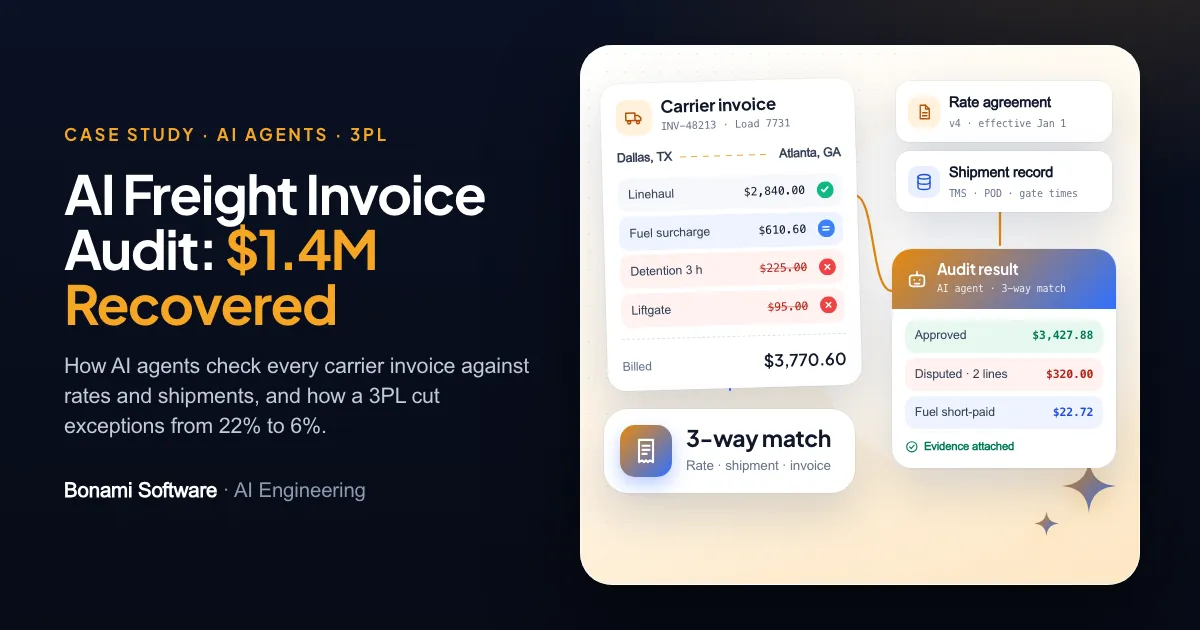
To be clear about our role: Bonami is not an accredited service provider, and we have not published a UAE e-invoicing case study. The closest published work is on the same problem from the other side of the invoice. For a national 3PL provider handling more than 12,000 carrier invoices a month, we built an agent that reads invoices, matches them against contracts and shipment data, and routes exceptions to people with the evidence attached.
Invoices arrived as PDFs, EDI and spreadsheets from many carriers, each with its own codes and layouts.
Every invoice was normalised into one structure before any rule ran, the same idea as the mapping layer above.
Configurable value and confidence thresholds kept unusual charges in front of people instead of auto-approving them.
Every match, exception and dispute was logged with its evidence, so finance could explain any decision later.
invoice exception rate, after the agent went live
Results as published in Bonami's 3PL invoice reconciliation case study. Client anonymised. A US accounts payable project, not a UAE e-invoicing deployment.
The lesson carries over directly. Exceptions fell because the data was normalised first, the rules ran before anything moved, and every exception had an owner and a record. That is the same discipline UAE e-invoicing asks of a supplier's billing process. The full story is in our freight invoice audit write-up.
How Bonami helps companies on custom and legacy ERPs
We work alongside your tax adviser and your chosen ASP. They own the tax interpretation and the exchange; we make your systems produce the data and handle what comes back.
Data readiness profile
We extract and profile your invoices and credit notes against the mandatory fields and give finance a prioritised fix list with counts.
Mapping layer and ASP connector
Extraction from the legacy system, canonical invoice, pre-validation, connector to your ASP and status write-back, built outside your ERP core by our legacy modernization and data engineering teams.
Exception queue and reconciliation
A rejection queue with owners and ageing, daily ERP-to-ASP reconciliation, and an optional AI agent that suggests the fix for common rejections.
Frequently asked questions about UAE e-invoicing
Is e-invoicing mandatory in the UAE?
Yes, for business-to-business and business-to-government invoices. Ministerial Decisions 243 and 244 of 2025 set the scope and the phases. Businesses with annual revenue of AED 50 million or more go live on 1 January 2027. Businesses below that threshold must appoint an accredited service provider by 31 March 2027 and go live on 1 July 2027. Government entities follow on 1 October 2027. Supplies to consumers (B2C) are out of scope, and a short list of transactions, such as certain financial services and international passenger air travel, is excluded.
What is the UAE e-invoicing deadline?
For businesses with revenue of AED 50 million or more, Ministerial Decision 66 of 2026 moved the deadline to appoint an accredited service provider to 30 October 2026, and mandatory e-invoicing starts on 1 January 2027. For businesses below AED 50 million, the ASP deadline is 31 March 2027 and go-live is 1 July 2027. Government entities appoint by 31 March 2027 and go live on 1 October 2027. Check the Ministry of Finance e-invoicing page before you plan, because dates have already changed once.
What is PINT AE?
PINT AE is the UAE version of the Peppol International invoice specification. It defines the structured XML invoice, based on UBL 2.1, that your accredited service provider sends across the Peppol network, along with the UAE-specific fields and validation rules. Your ERP does not usually have to produce PINT AE itself. It has to produce clean, complete invoice data that your ASP can convert and validate.
What is the 5-corner model in UAE e-invoicing?
It is the decentralised exchange model the UAE uses. Corner 1 is the supplier and its ERP. Corner 2 is the supplier's accredited service provider, which validates and sends the e-invoice. Corner 3 is the buyer's accredited service provider, which receives it. Corner 4 is the buyer. Corner 5 is the Federal Tax Authority. The buyer's ASP validates the invoice too, and both service providers report tax data to the FTA in parallel with delivery. There is no clearance by the FTA before the invoice reaches the buyer.
Do we need to replace our legacy ERP for UAE e-invoicing?
Usually not. The mandate is about the data each invoice carries and how it is exchanged, not about which ERP you run. Most custom and older systems can comply through an extraction and mapping layer that pulls invoice data, fixes and enriches it, and hands it to an accredited service provider. Replacement only makes sense if the system cannot produce reliable line-level tax data or cannot be changed at all.
What data does a legacy ERP need for UAE e-invoicing?
The Ministry of Finance mandatory fields guidance (version 1.1, October 2026) lists 51 fields for a tax invoice and 49 for a commercial invoice. For legacy systems the hard ones are usually the buyer's tax identifier and Peppol address, the eight-flag transaction type code, coded units of measure, VAT category and rate on every line, line amounts and VAT in AED even on foreign-currency invoices, the invoice type code, and a reference to the original invoice on every credit note.
What happens if an e-invoice is rejected?
A rejection comes back as a status message, for example a Peppol message level status of RE with a reason such as a business rule failure. The invoice has not been validly exchanged, so you correct the data at source, in the ERP or the mapping layer, and resubmit. There is no separate published resubmission deadline, but the 14-business-day window for issuing the e-invoice still runs, so do not let rejections age. Never fix the XML by hand in the ASP portal, because the ERP and the tax record will then disagree.
What are the penalties for UAE e-invoicing non-compliance?
Cabinet Decision 173 of 2026 sets them. Failing to implement e-invoicing or appoint an ASP, as an issuer or a recipient, costs AED 5,000 and then AED 5,000 for each further month, capped at AED 50,000 in any 12 months. Failing to issue or transmit an e-invoice or e-credit note costs AED 100 per document, capped at AED 5,000 a month. Failing to tell your ASP about changes to your registered data costs AED 250 a day, capped at AED 5,000 a month. Penalties apply once your mandatory phase starts.
Where is the list of accredited service providers for UAE e-invoicing?
The Ministry of Finance publishes the list on its e-invoicing pages. On 21 November 2026 it named 88 accredited service providers, all fully accredited under Ministerial Decision 168 of 2026. Use only the official list. Compare shortlisted providers on ERP connectors, error reporting, status callbacks, archiving and support for your transaction types, not on price alone.
Do we still need PDF invoices after e-invoicing goes live?
Sometimes. If your buyer is not yet on the e-invoicing system, for example because they fall into a later phase, the guidelines say you issue the e-invoice with the predefined buyer endpoint 0235:9900000098 and also send a regular tax invoice such as a PDF. Between 1 January and 1 July 2027 many large suppliers will be in this position with smaller buyers, so keep PDF output working.
The takeaway: fix the data, write the handoff, staff the queue
A custom or legacy ERP is not a reason to miss the UAE e-invoicing deadline, and it is rarely a reason to replace the system. The mandate cares about the data on each invoice and how it reaches your buyer and the FTA. Get the customer tax IDs, units, line-level VAT and credit note references right; put a mapping and pre-validation layer between the ERP and your ASP; and agree, in writing, who fixes what.
Then treat go-live as the start of an operating process. A daily reconciliation, a rejection queue with an owner and a clock, and a habit of turning repeated exceptions into rules will do more for compliance than any feature list.
Running UAE invoicing on a system nobody wants to touch?
Tell us which ERP or billing system you use, how many invoices you issue a month and which phase you are in. We will tell you what we would fix first and how we would connect it to your ASP.
This article is general guidance, not legal or tax advice. Dates, scope and penalties are summarised from Ministerial Decisions 243 and 244 of 2025, Ministerial Decisions 66, 168 and 197 of 2026, Cabinet Decision 173 of 2026, the Ministry of Finance Electronic Invoicing Guidelines v2.0 and Mandatory Field Requirements v1.1, as published on 23 November 2026; check the Ministry of Finance and FTA websites and your tax adviser before acting. Bonami Software is not an accredited service provider. The hero illustration, field map, sample queries, handoff record and exception messages are illustrative. Case-study results are quoted from Bonami's published case study; the client is anonymised and results will differ for other organisations.